Why We Built Our Own Client Portal
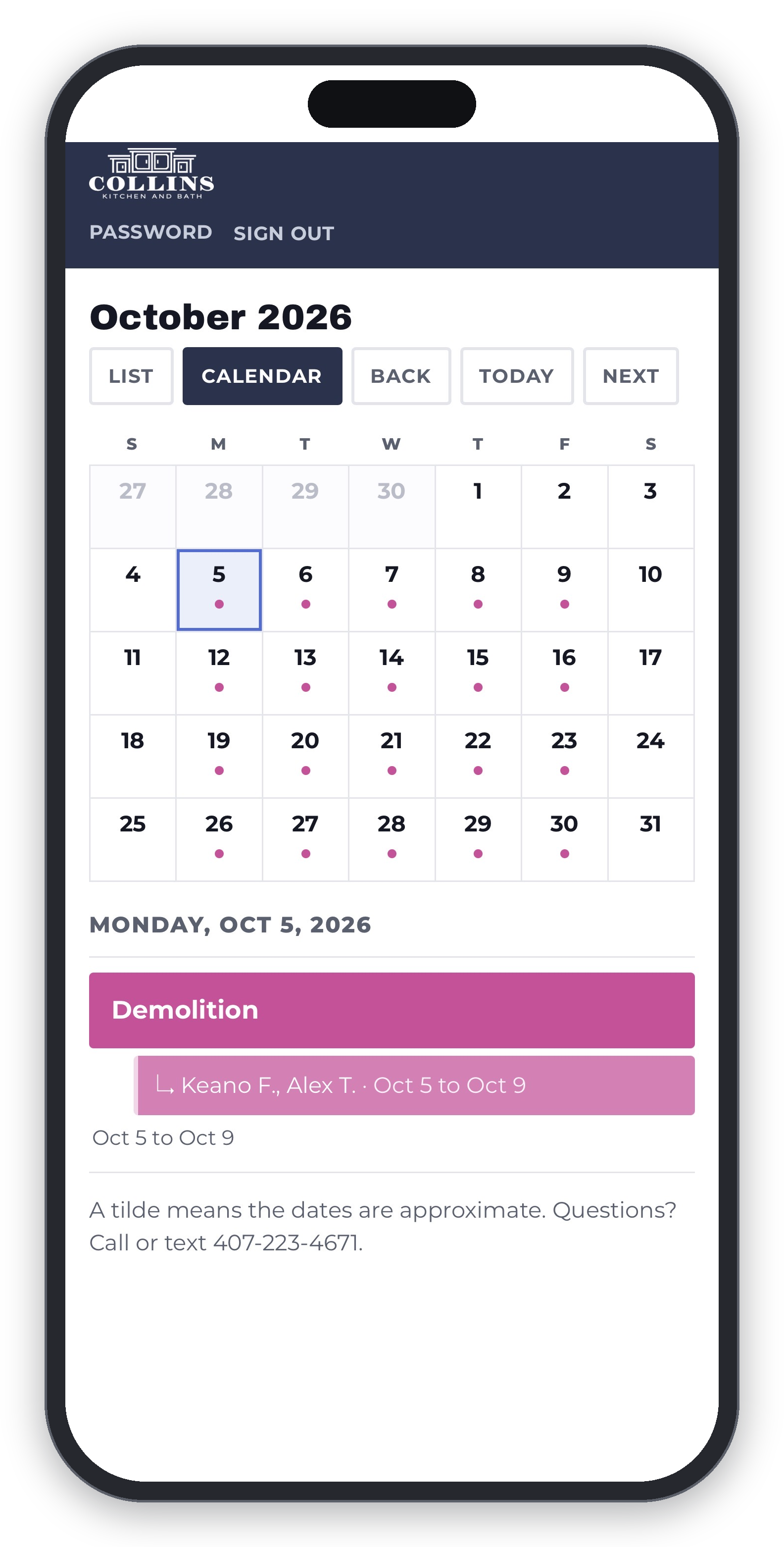
The client portal on a phone. Who is coming, and when.
I built our client portal myself. We didn't hire a developer or sign up for software.
Here is why.
We stay in contact with our clients. That part was fine. What wasn't fine was where the information ended up. A text on Monday, an email on Wednesday, something said in a driveway on Friday. I'd catch myself wondering if I had already told somebody about a delivery date. Clients would ask the same question three times because the answer was buried in a thread from two weeks back. Plenty of times I was the one scrolling my own texts looking for something I knew I had sent.
What Our Clients See
Every client gets a login. Their project is laid out week by week, first week of work through the last, with the work planned for each one. Switch to the calendar and you see who is scheduled to be at the house on a given day, our crew by first name and trades by company, with inspections sitting there as their own items on their own dates.
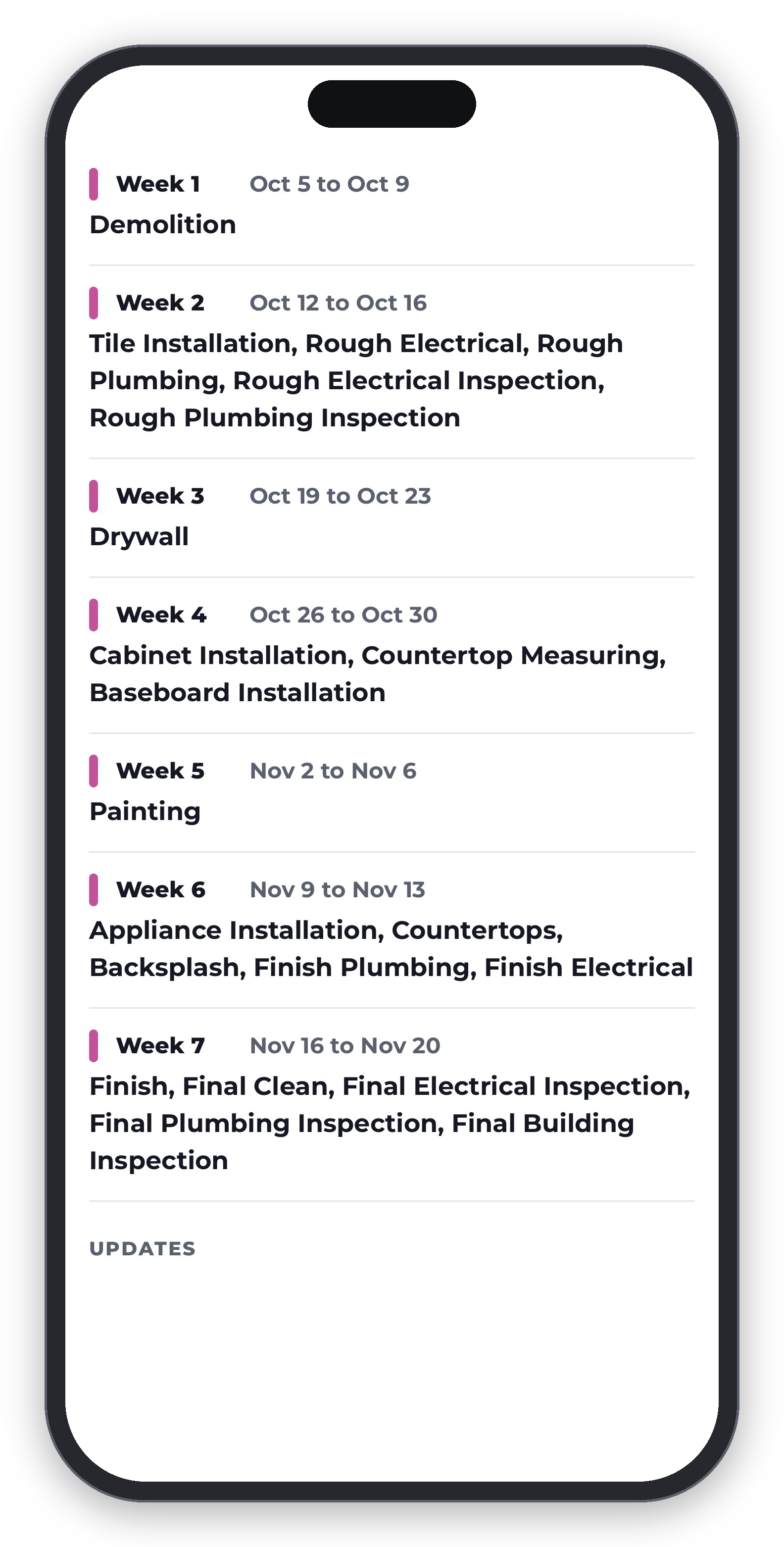
The full project schedule, week by week.
We work toward weekly goals rather than promising a specific day for everything. Trades and inspections get pinned to days because they have to be, and those can slide a day either direction depending on how the job runs and when an inspector can get out. Permits and inspections are half of what makes a remodel take as long as it does, and the schedule shows them as their own items rather than burying them. Every active schedule says as much underneath it, that the dates are estimates and can change. They do change. What matters is that you hear about it when they do.
You Do Not Have To Go Looking
Schedule changes work differently depending on how soon the work is. If something moves in the next couple of days, an email goes out an hour after the change. That hour lets me make several edits in a row without sending you ten separate messages.
Changes further out don't touch your inbox at all. Next time you open the portal there is a banner at the top telling you which job was updated. A week in October moving is worth knowing about. It isn't worth an email at nine at night.
New photos or notes on your job send an email at 4:30 in the afternoon. Anything posted after that reaches you the following day.
You can also turn on notifications and get them straight to your phone.
Photo Updates From The Job
Our crew posts updates from the field with photos and a short description of what got done. Drywall mud and texture completed, walls received first coat of paint. Time stamped, with the crew member's name on it.
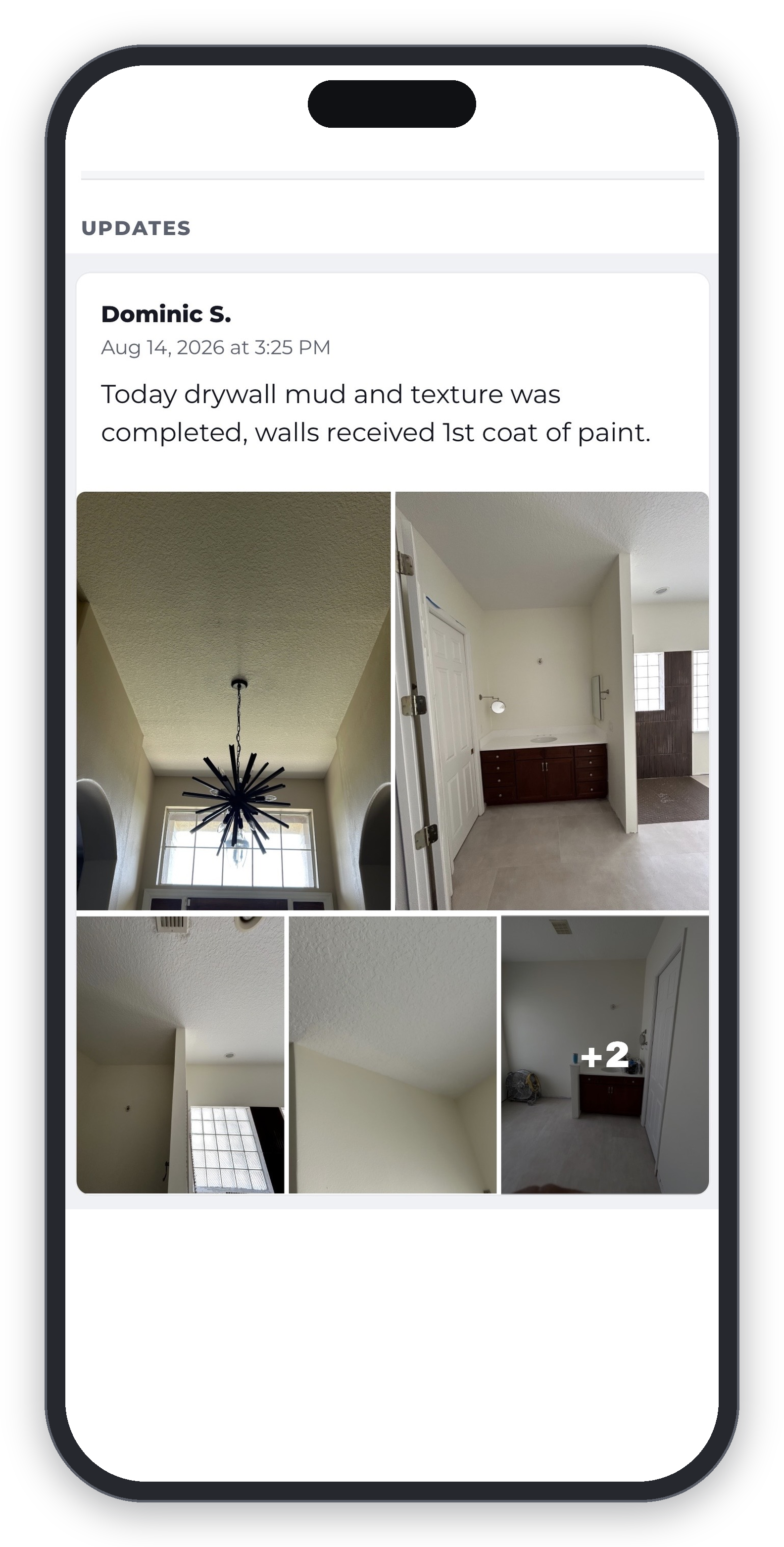
A client who is out of the house for the day, away on vacation, or gone for the evening can open their phone and see it without calling to ask.
Your Project Doesn't Disappear When It's Done
When we mark a job complete, it's labelled with the date it finished and your schedule becomes a record of what happened rather than a plan that might still move. You keep your login, your photos, and every update. The daily emails stop, because there's nothing left to report.
If you have us back for a second project, the new one sits at the top and the finished one tucks away underneath. You can open it any time.
Your Whole Project In Your Pocket
There is a Client Portal button in the menu on our website, so you can get to it from wherever you already are. It also installs to your phone's home screen like an app. Open it from the couch, from your desk at work, from the school pickup line.
Where Our Values Show Up
We list five core values on our website. Three of them are why this thing exists.
Responsiveness means keeping clients informed through clear and consistent communication. Now it happens in one place instead of across a dozen threads.
Punctuality means respecting timelines. The schedule gets planned before we start and it stays visible the whole way through.
Integrity means doing the right thing and handling every detail with care. When a date moves you see it move. We are not editing the story after the fact.
Why It Matters
For clients it means the answer to most questions is already sitting there. What is happening this week, who is coming, what got finished yesterday. For our crew it means everybody knows what they are assigned to and can post what they finished without it turning into a phone call to the office.
A remodel is a stressful thing to live through. Your house is torn up, people you don't know are in it every day, and you are still trying to keep your own life running. We can't make that easy. We can make it easier to know where things stand.
Frequently Asked Questions
Do I have to download an app?
No. The portal opens in your web browser. If you want it on your home screen you can add it there in a few taps. On an iPhone that has to be done from Safari. On Android, Chrome and most other browsers will do it.
Where do I find the portal?
There is a Client Portal button in the menu on our website. You can also add it to your phone's home screen and open it from there.
How do I log in?
When we set up your project you get an email with a one-time link. You open it and pick your own password. We never see it or set it for you. If you forget it there is a reset link on the sign-in page.
How often are updates posted?
Updates go up when there's completed work worth showing you. Some weeks that's several. Some weeks a job is waiting on a delivery and there's nothing to show you.
Will I get an email when something happens?
New photos or notes send an email at 4:30 in the afternoon, so anything posted after that reaches you the next day. A schedule change affecting work in the next couple of days sends an email an hour after the change. Changes further out don't send an email. You will see a banner in the portal next time you open it telling you which job was updated.
Can I get notified on my phone instead?
Yes. Once the portal is on your home screen you can turn on notifications and they come straight to your phone. On an iPhone it has to be installed first. On Android it works either way.
What if something changes late at night?
Nothing sends between nine at night and six in the morning. It waits and goes out at six. A change made before around eight in the evening reaches you that night. Anything later arrives first thing the next morning.
Can I see the whole project schedule or only this week?
Both. The list view runs the entire project week by week. The calendar shows any given day and who is assigned to it.
Are the dates on my schedule exact?
They are our plan, and every active schedule in the portal says so underneath it. We schedule by the week and work toward finishing what is planned for that week. Trades and inspections get specific days and those can shift a day either direction depending on how the job runs and how the inspection schedule falls.
Does every client get access?
Yes. It comes with your project. Your login stays active after the job is finished, nothing expires, and we don't delete your schedule or photos. You can sign back in and look at your project any time.
Is my project information private?
Your portal is password protected and shows your projects only.
Is my billing in there?
No. The portal holds your schedule and your photos. Contracts, change orders, and payments are handled separately.
Can I reply or ask a question in the portal?
Not in the portal. Call or text us at 407-223-4671. That reaches a person, which is faster than typing into a box and waiting.
See Your Project The Way We Do
Every Collins Kitchen and Bath client gets portal access with their project. If you are planning a kitchen, bathroom, or whole home remodel in Central Florida, reach out and we will walk you through what working with us looks like from the first day to the last.